
Driving Licence Check Online 2026 – DL Status & Search
A Driving Licence Check helps you verify your driving licence information and track your application online in India. The Ministry of Road Transport and Highways (MoRTH) provides digital transport services through the official Parivahan portal, allowing applicants and licence holders to access various services without visiting the Regional Transport Office (RTO) for every enquiry.
Whether you have recently applied for a driving licence, want to check your application status, or need to retrieve your licence details, online services can make the process easier.
In this guide, you will learn how to check driving licence status online, recover a lost application number, search for an existing DL using your licence number, and find your licence details using available search options.
How to Driving Licence Check Status Online
If you have applied for a learner’s licence or permanent driving licence, you can use the Parivahan Sewa portal to check your application progress.
Follow these steps:
Step 1: Visit the Official Parivahan Website
Open the Parivahan Sewa portal, which provides official transport-related services.
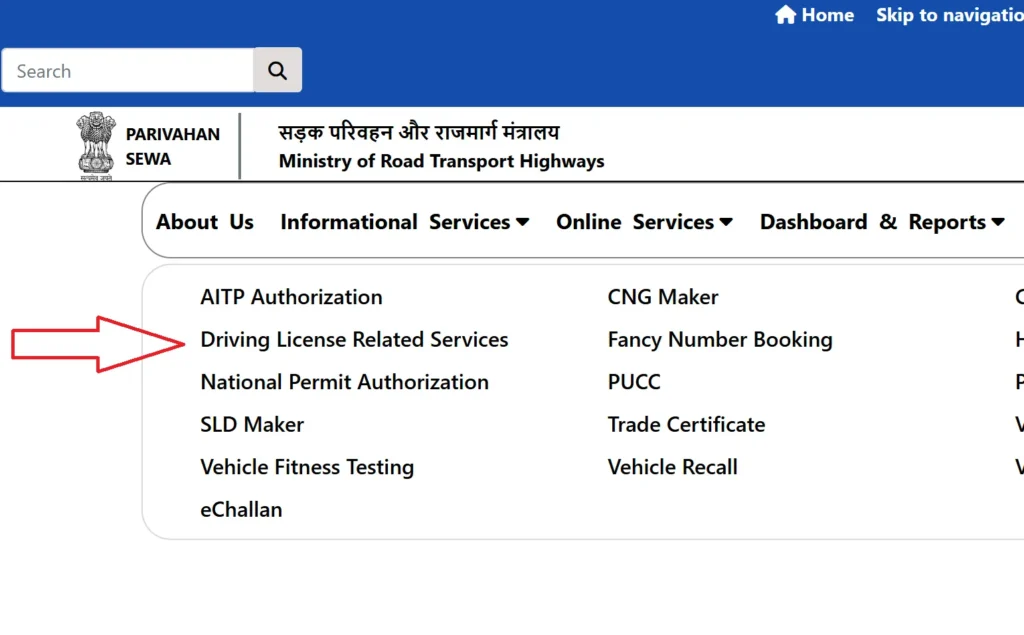
Step 2: Open Driving Licence Related Services
Select Online Services and click on Driving Licence Related Services.
Step 3: Select Your State
Choose the state where you submitted your driving licence application. The portal will redirect you to the relevant state services.
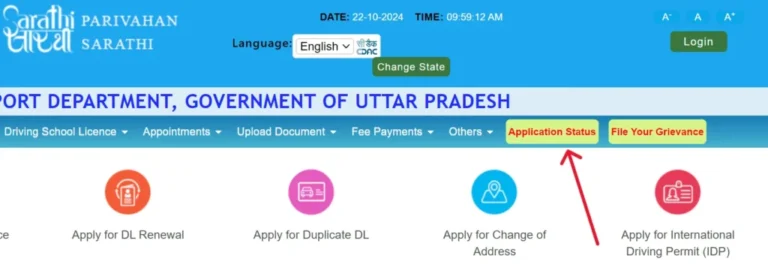
Step 4: Click on Application Status
On the state-specific page, select Application Status from the available options.
Step 5: Enter Your Application Details
Provide the information requested on the status page:
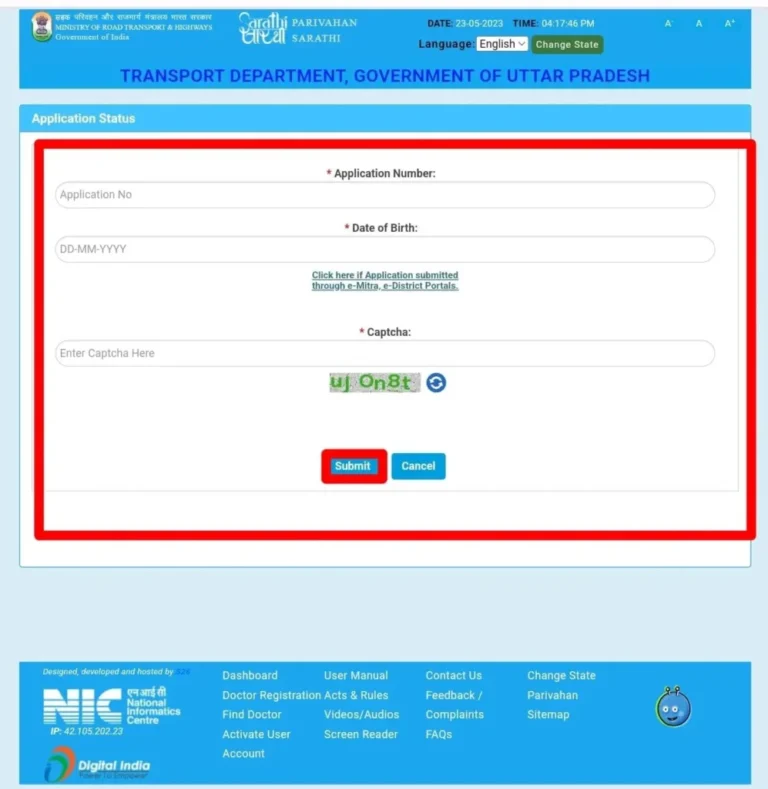
- Application Number: The reference number issued when you submitted your application.
- Date of Birth: Your date of birth in the required format.
- Captcha: The verification code displayed on the screen.
Step 6: Submit and Check Your Status
Click Submit to view the available application details.
Depending on your application, the status may indicate that your application is pending, under verification, approved, or awaiting another step. Follow any instructions displayed on the portal.
How to Find a Lost Driving Licence Application Number
If you have misplaced your driving licence application number, you may be able to retrieve it through the Parivahan portal.
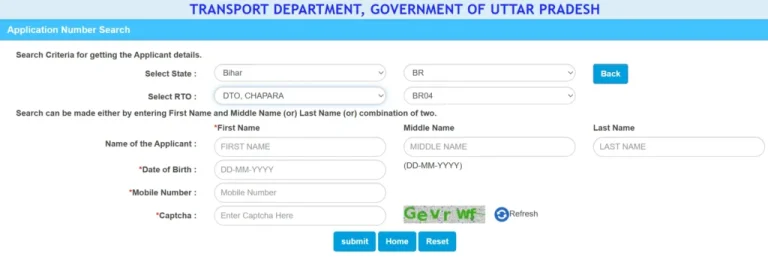
Steps to Recover Your Application Number
- Visit the Parivahan Sewa website.
- Open Driving Licence Related Services.
- Select the state where you applied.
- Open the Others menu and select Find Application Number, if available.
- Enter the requested details, such as your name, date of birth, registered mobile number, and RTO.
- Complete the captcha verification.
- Click Submit to check whether your application number can be retrieved.
Once you recover your application number, return to the Application Status section to track your application.
Tip: Enter your personal details exactly as they appear in your application records. Incorrect information may prevent the portal from finding your application.
How to Search for a Driving Licence Using a DL Number
If you already have your driving licence number, you can use the available Parivahan services to check your licence information.
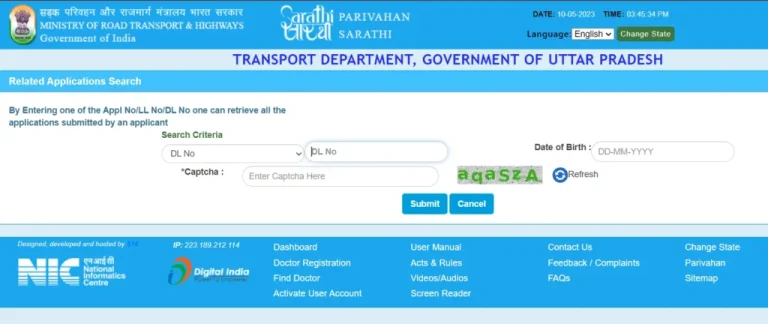
Steps to Check DL Details
- Visit the Parivahan Sewa portal.
- Select Driving Licence Related Services and choose your state.
- Open the relevant licence search service. The menu may include options such as Search Related Application or DL Search.
- Enter your driving licence number and date of birth, along with any other requested details.
- Complete the captcha and submit your information.
If your record is available, the portal may display details such as:
- Licence holder’s name
- Driving licence number
- Licence issue date
- Licence validity
- Authorized vehicle class
The information displayed depends on the service and the availability of your record.
How to Search for a Driving Licence by Name and Address
If you have lost your physical driving licence and do not remember the DL number, the DL Search or Advanced Search service may help you locate your record.
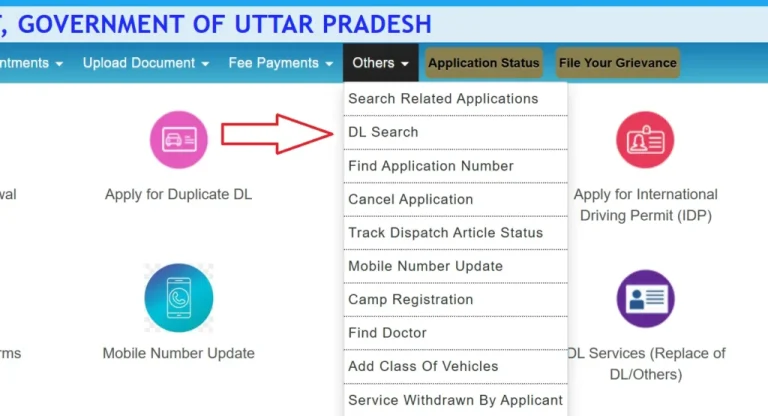
Steps to Search Without a DL Number
- Visit the Parivahan Sewa portal.
- Select Driving Licence Related Services and your state.
- Open the Others menu and select DL Search, if available.
- Choose Advanced Search where the option appears.
- Enter the requested personal information. This may include your name, address, date of birth, or other identifying details.
- Complete the captcha verification.
- Click Search to check for matching records.
Search options and available fields vary by state. If you cannot locate your record online, contact the RTO that issued your licence.
How to Check Driving Licence Details Offline
If online services do not show your record or you need help correcting your details, you can visit your local RTO.
Before visiting, prepare the following where available:
- Your driving licence or a photocopy
- Application number or acknowledgement receipt
- Aadhaar card, passport, or another accepted identity document
- Date-of-birth proof
- Any documents related to your licence application
Explain your request to the RTO officer. The office can guide you through checking your licence record, retrieving your application details, or correcting an error.
Tip: Contact the RTO beforehand to confirm the documents required for your particular service.
FAQs
1. How can I check my driving licence status online?
Visit Parivahan Sewa, open Driving Licence Related Services, select your state, and click Application Status. Enter your application number, date of birth, and captcha to view your status.
2. Can I check my DL status without an application number?
You may first be able to retrieve your application number through the Find Application Number service on Sarathi Parivahan. Once you recover it, use the Application Status service.
3. How can I search for my driving licence without a DL number?
Use the DL Search or Advanced Search option on your state’s Parivahan services page, if available. Enter the requested personal details and submit the search.
4. What information can I check using my driving licence number?
Depending on the available service and your record, you may be able to view your name, licence number, issue date, validity period, and authorized vehicle class.
5. Can I check my driving licence validity online?
Yes. Use the official Parivahan services to view available licence details and validity information. Check the validity dates carefully before driving.
6. What should I do if my driving licence status shows pending?
Check whether the portal lists a pending verification, test, payment, or document requirement. If no action is shown and the delay continues, contact your RTO.
7. Is it safe to check driving licence details online?
Use official government websites such as Parivahan and Sarathi. Avoid sharing OTPs, passwords, or unnecessary personal information with unofficial websites.
Final Words
A Driving Licence Check helps you track your application, verify your licence information, and identify issues without making an unnecessary trip to the RTO.
Use the official Parivahan Sewa portal to check your DL status, recover your application number, or search for available licence details. If your record is missing or contains incorrect information, contact the issuing RTO for assistance.
For more information about vehicle registration, RC status, and transport services, visit Vehicle Owner Details.