Driving Licence Download – DL Download | Print DL PDF
Downloading your Driving Licence online is now quick and convenient through the Government of India’s official digital services. If you need a digital copy for verification, travel, or other official requirements, you can access it easily through DigiLocker, the mParivahan app, or the Sarathi Parivahan Portal. These secure platforms let you view, download, save, and print your driving licence online within just a few minutes.
Driving Licence Download
Access your driving licence online through the official portal.
Enter your valid driving licence number to continue.
Visit Official Sarathi PortalA digital driving licence is recognized for use across India and can be shown to traffic police and other government authorities. It includes secure digital features that make verification quick and convenient. Instead of carrying your physical licence everywhere, you can keep the digital copy safely on your mobile phone or computer and access it whenever needed.
This comprehensive guide explains how to download your Driving Licence online in India through official government platforms. You’ll also learn how to save a PDF copy, print your licence, retrieve it if your physical card is lost, troubleshoot common download issues, and protect your personal information while using online licence services.
Quick answer: For an existing licence, use the official Sarathi Parivahan service for applicable print options, DigiLocker to fetch an issued digital document, or mParivahan to access your Virtual DL. If your record does not appear, check your licence details and whether the record exists in the National Register.
Process to Download Driving Licence
You can download your Driving Licence in PDF format using two simple methods. Follow the steps to download:
Download Driving Licence from Sarathi Parivahan Service Portal
The Sarathi Parivahan Service Portal, launched by the Government of India, provides various services related to driving licences and other transport-related needs. You can use the portal to access and download a copy of your driving licence online. Follow these simple steps:
- Open the official Sarathi Parivahan Service portal parivahan.gov.in.
- Choose the State from menu.
- Click on “Online Services” then “Driving Licence Download”.
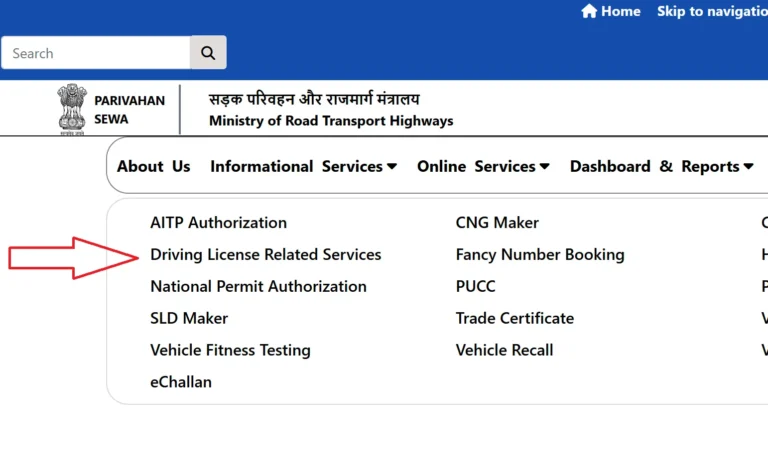
- Choose the DL Services/Print Driving Licence/DL Extract.
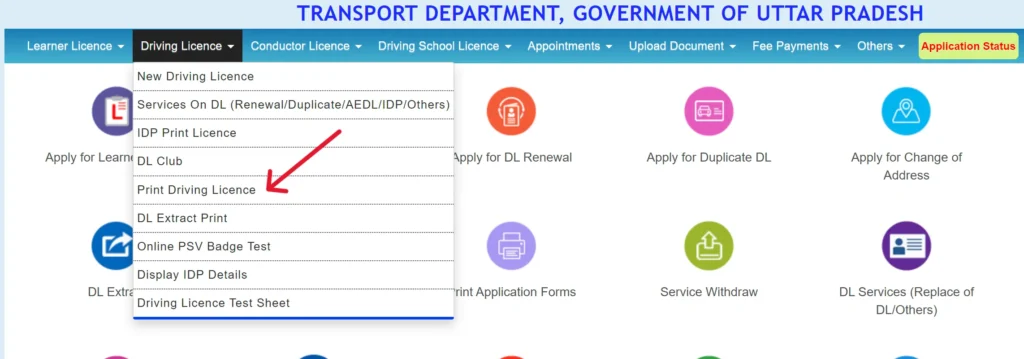
- Verify the Captcha code and submit the details.
- See your driving information is show on screen.
- Click on Download or Print option and save it.
Driving License Download from DigiLocker
The DigiLocker portal allows you to securely access, download, and store important government documents, including your Driving Licence, Aadhaar Card, PAN Card, and other official records. A driving licence downloaded through DigiLocker is digitally issued and recognized by the Government of India, making it legally valid across the country.
- Visit to DigiLocker website or mobile app.
- Login with your registered mobile number and verify OTP.
- Click on “Search Documents” or “Issued Document” option.
- Open the Ministry of Road Transport and Highways.
- Click on option of Driving Licence.
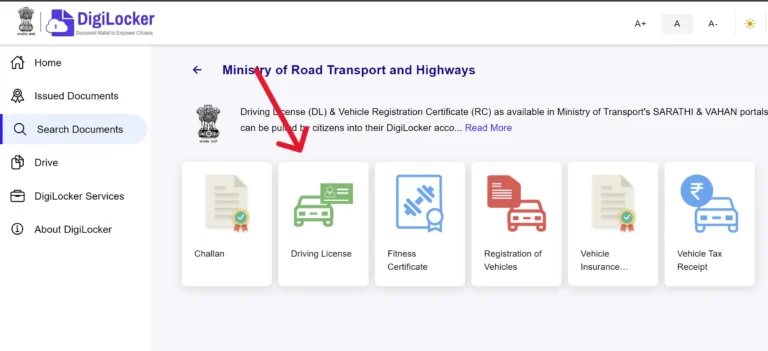
- Enter your Driving Licence number and required details.
- Click on Submit and get details of your licence.
- Once verified, your driving licence show in your DigiLocker account.
Requirements
- Proof of Identity (Aadhaar Card / Passport / Voter ID / PAN Card)
- Proof of Address (Aadhaar / Utility Bill / Ration Card / Passport)
- Age Proof (Birth Certificate / 10th Marksheet / Passport)
- Passport-size Photographs
- Learner’s Licence (for Permanent DL application)
- Medical Certificate (Form 1A – required for certain age groups or commercial licences)
- Application Form (filled online through the portal)
- Valid Mobile Number for OTP verification
- Fee Payment Receipt
Note: Enter your driving license number in mParivahan app and get your DL.
Download Driving Licence via mParivahan App
- Download and install the mParivahan app from Google Play Store.
- Login with your registered mobile number and verify OTP code.
- Click on DL Services or Add Driving Licence option.
- Enter your Driving Licence number and required details.
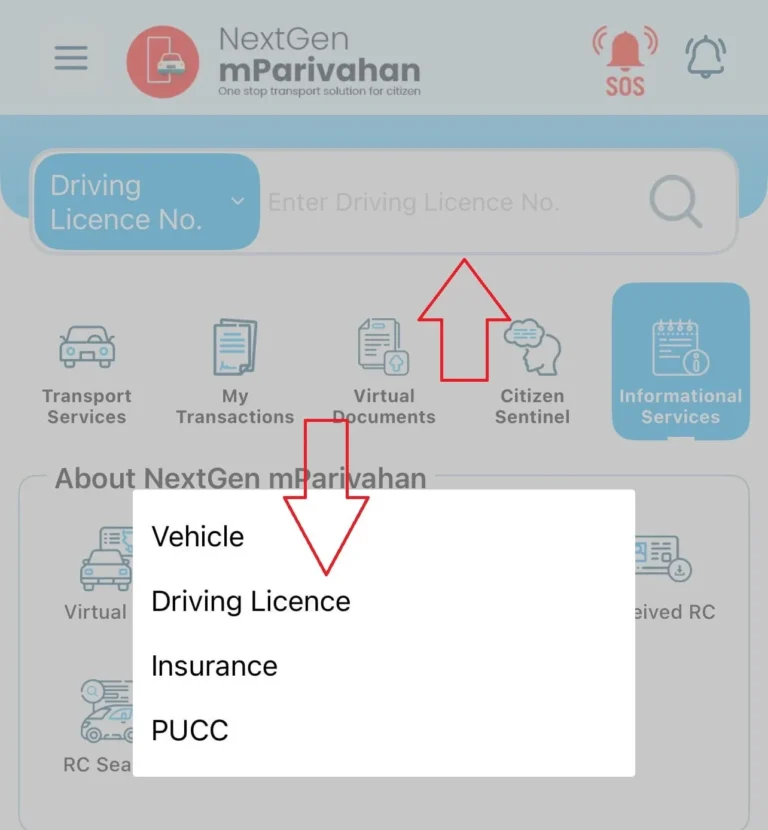
- Click on Submit to check your licence details.
- Once verified, your digital driving licence show in app.
- Use anytime in roads or show in traffic checks.
Requirements:
- Valid Driving Licence Number
- Date of Birth (as per licence record)
- Registered Mobile Number for OTP verification
- Smartphone with mParivahan app installed
- Active internet connection
- Basic personal details matching DL records
Important Info
- The virtual Driving Licence (DL) stored in the mParivahan app is legally valid and accepted in India.
- For physical DL forms, visit https://sarathi.parivahan.gov.in/.
- Ensure details match your official DL to avoid errors.
| Feature | Details |
|---|---|
| Security Features | Encrypted QR codes can be scanned by authorities for instant verification, helping prevent fraud and misuse. |
| Offline Access | Download your Driving Licence through DigiLocker or mParivahan to access it even when you’re offline. |
| Multi-Device Sync | Access and sync your Driving Licence across multiple devices by using the same registered mobile number with DigiLocker. |
| Renewal Alerts | Access and sync your Driving Licence across multiple devices by using the same registered mobile number with DigiLocker. |
| Language Support | Sarathi Parivahan and DigiLocker offer support for multiple regional languages, making their services easier for users across India to access and understand. |
| File Size | Driving Licence Download PDF files are generally under 1 MB, making them easy to store and share. |
| Backup Recommendation | Save DL PDFs in secure cloud storage or external drives to prevent accidental data loss. |
| Verification Process | Traffic police use QR scanners to verify digital DL instantly; keep the app or PDF accessible during checks. |
| Legal Validity | Digital DL is legally accepted under government notification and valid for official verification. |
| Instant Availability | Once fetched, the DL is immediately available for viewing, downloading, or sharing. |
| Paperless Compliance | Supports India’s digital initiative by reducing the need to carry physical documents. |