
eChallan Status Check Online – Pay Traffic Challan on Parivahan
Have you received a traffic challan and want to check its status online? The eChallan Status Check service helps vehicle owners and drivers in India view traffic fines, verify violation details, and pay eligible penalties through the official government portal.
The Ministry of Road Transport and Highways (MoRTH) provides digital traffic challan services through the Parivahan eChallan portal. You can check your challan using your vehicle registration number, challan number, or driving licence (DL) number.
Whether you want to verify a recent traffic violation, check pending fines, or confirm a previous payment, this guide explains how to check eChallan status online, pay traffic fines, resolve payment issues, and dispute an incorrect challan.
Check eChallan Status Online
Use the official government portal to check your traffic challan details. Official eChallan portal: echallan.parivahan.gov.in
You may need your vehicle registration number, challan number, or driving licence number. Depending on the selected search method, the portal may also request additional verification details, such as your chassis or engine number.
What Is an eChallan?
An eChallan is an electronic traffic violation notice issued by authorized traffic police or transport authorities when a driver violates applicable traffic rules.
Unlike traditional paper challans, an eChallan is generated and recorded digitally. Authorities may issue one through electronic surveillance systems, traffic cameras, or handheld devices used by traffic officers.
An eChallan may contain:
- Challan number and vehicle registration details
- Type of traffic violation
- Date, time, and location of the offence
- Applicable fine amount
- Payment status and other relevant information
The digital system helps authorities record traffic violations and allows drivers to check their challan details online.
How to Check eChallan Status Online
You can check your eChallan using three methods:
- Vehicle registration number
- Challan number
- Driving licence number
Choose the method that matches the information you have available.
1. Check eChallan by Vehicle Number
If you know your vehicle registration number, follow these steps:
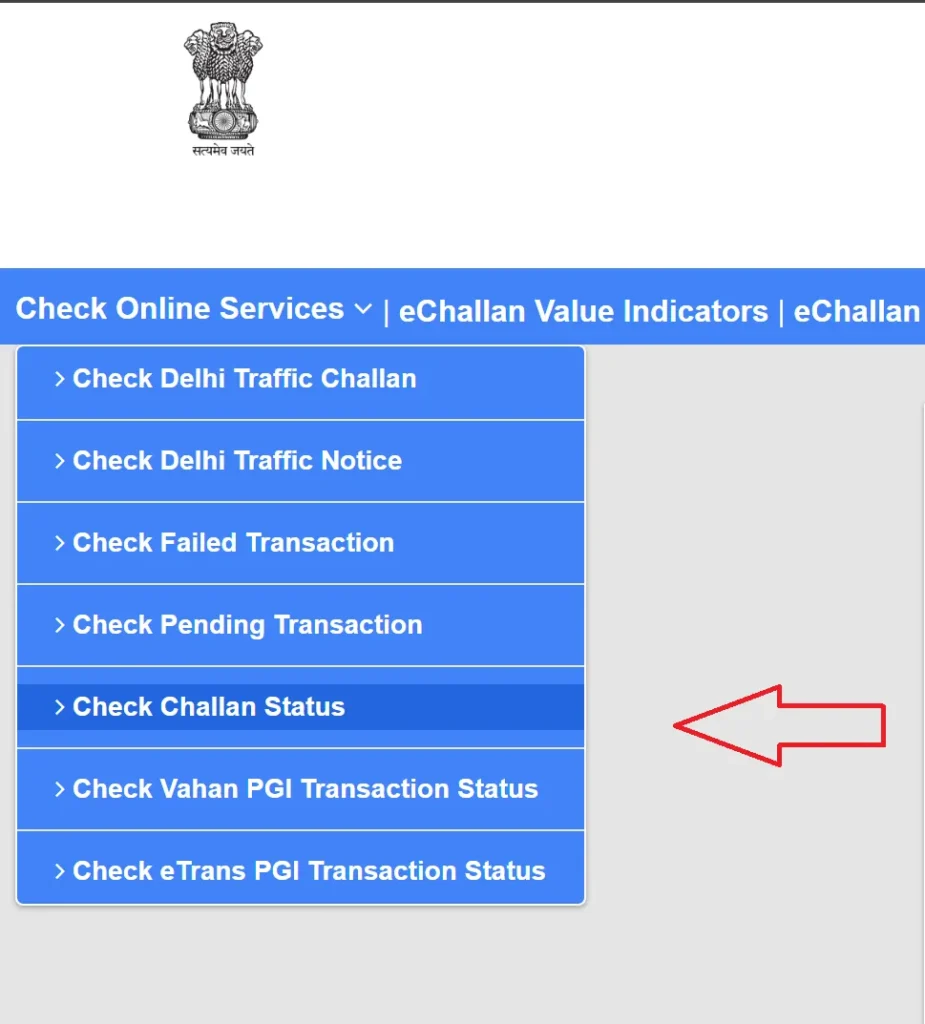
- Visit the official eChallan portal.
- Open the challan status or payment section.
- Select the Vehicle Number search option.
- Enter your vehicle registration number, such as DL1AB1234.
- Provide any additional verification details requested, such as the last digits of your chassis or engine number.
- Enter the captcha code.
- Click Get Details to view the available challan information.
The portal will display matching challans, if any, along with their violation details and payment status.
2. Check eChallan by Challan Number
If you have received a challan notice, checking it by challan number is usually straightforward.
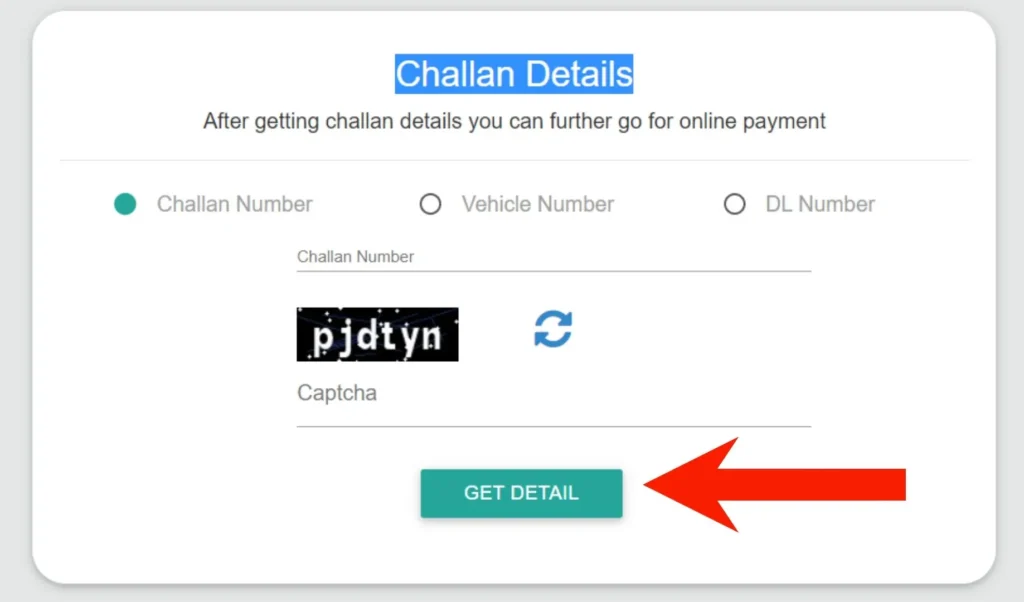
- Open the eChallan Parivahan portal.
- Select the challan status or payment service.
- Choose Challan Number as your search method.
- Enter the challan number printed on your notice.
- Complete the captcha verification.
- Click Get Details.
Review the violation date, location, fine amount, and payment status before proceeding.
3. Check eChallan by Driving Licence Number
You can also search for traffic challans associated with your driving licence.
- Visit the official eChallan website.
- Open the challan status service.
- Select Driving Licence (DL) Number.
- Enter your driving licence number.
- Complete the captcha verification.
- Click Get Details.
The portal will show available challans associated with your licence details.
How to Pay eChallan Online
You can pay eligible traffic fines through the official eChallan portal without visiting a traffic police office.
Step-by-Step Online Payment Process
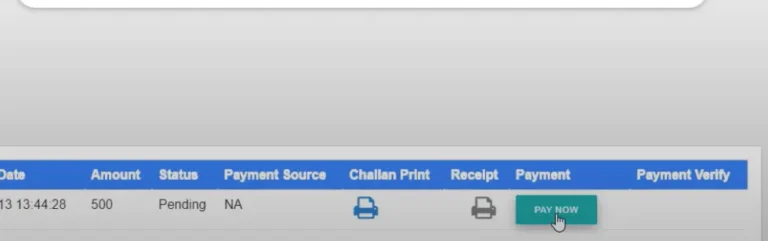
- Visit echallan.parivahan.gov.in.
- Select the challan status or payment option.
- Search using your vehicle number, challan number, or DL number.
- Enter the requested verification details and click Get Details.
- Review the list of challans linked to your information.
- Select the challan you want to pay.
- Click Pay Now or the corresponding payment option.
- Choose an available payment method and complete the transaction.
- Download or save your payment receipt.
Available Payment Methods
Depending on the portal and payment gateway, available methods may include:
- UPI
- Debit card
- Credit card
- Net banking
- Other payment options displayed on the official portal
Check the payable amount carefully before confirming the transaction. Save your receipt and transaction reference number for future use.
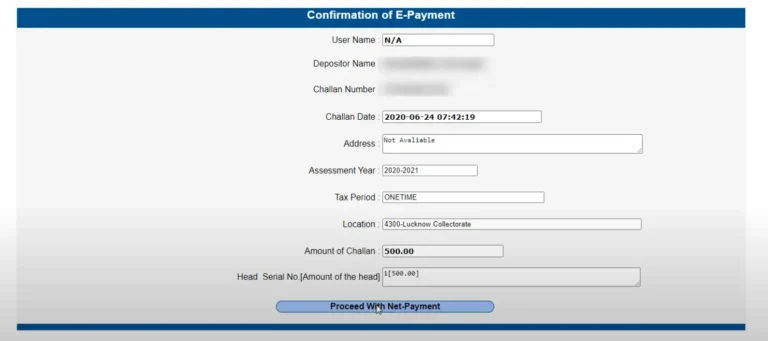
After payment, return to the portal and check whether the challan status has updated. Payment confirmation may take some time to appear.
How to Pay eChallan Offline
If you cannot pay online, you may be able to pay through an authorized traffic police office, RTO, or other designated payment centre.
Follow these steps:
- Visit the relevant traffic police office or authorized payment centre.
- Provide your challan number, vehicle number, or driving licence details.
- Ask the officer to verify the challan and payable amount.
- Pay using the payment methods accepted at that location.
- Collect and keep the official payment receipt.
Offline payment facilities and accepted payment methods vary by location. Contact the relevant authority before visiting.
Traffic Rules and Challan Fines in India
Traffic penalties in India are governed by the Motor Vehicles Act, 1988, as amended, along with applicable state rules and notifications.
The following table provides examples of common traffic violations and the penalties commonly associated with them. The actual amount may depend on the offence, vehicle category, previous violations, and applicable state rules.
| Traffic violation | Commonly applicable penalty |
|---|---|
| Driving without a valid licence | ₹5,000 |
| Driving without valid insurance | ₹2,000 for a first offence; ₹4,000 for a subsequent offence |
| Riding without a helmet | ₹1,000 |
| Not wearing a seat belt | ₹1,000 |
| Using a mobile phone while driving | Penalty depends on the applicable offence |
| Over-speeding | Varies by vehicle category and applicable rules |
| Driving under the influence | ₹10,000 for a first offence; ₹15,000 for a subsequent offence |
| Juvenile driving | ₹25,000 and additional legal consequences |
| Not giving way to emergency vehicles | ₹10,000 |
| Driving without a valid pollution certificate | Penalty may apply under the relevant provisions |
Important: This table is for general information, not a final assessment of your liability. Check the amount shown on your official challan and confirm the applicable penalty with the issuing traffic authority. Additional penalties, licence suspension, vehicle impoundment, or court proceedings may apply to certain offences.
Important Things to Remember About eChallan
Pay Within the Applicable Deadline
Check the payment deadline mentioned on your challan. Some challans may require payment within 60 days, but the applicable deadline and consequences of non-payment depend on the notice and relevant rules.
Verify Challan Details Before Paying
Review your vehicle number, challan number, violation type, date, location, and fine amount. Make sure the details match your vehicle and the alleged offence.
Save Your Payment Receipt
Download the receipt or save the transaction reference after paying. It can help you resolve payment disputes or verify that your fine has been cleared.
Report an Incorrect Challan
If you believe a challan was issued incorrectly, contact the issuing traffic police authority or use the official grievance facility, where available. Keep supporting evidence ready.
How to Dispute an Incorrect eChallan
If you believe the traffic authorities issued a challan in error, review the details and submit a complaint through the appropriate official channel.
Step 1: Verify the Challan
Check the vehicle registration number, violation type, date, time, location, and fine amount.
Step 2: Collect Supporting Evidence
Depending on the situation, useful evidence may include:
- Photographs or dashcam footage
- Vehicle registration documents
- GPS or travel records
- Parking receipts or toll receipts
- Other documents that support your objection
Step 3: Contact the Issuing Traffic Authority
Use the official grievance facility, helpline, email, or office details provided with the challan. Explain the issue clearly and submit your supporting evidence.
Step 4: Follow Up With the RTO or Traffic Police
If the issue remains unresolved, contact the relevant RTO or traffic police department for further instructions.
Step 5: Attend Court if Required
If the challan has been referred to court, follow the instructions on the notice and attend the scheduled hearing with the required documents.
Tips to Avoid Traffic Challans
Following traffic rules helps protect you, your passengers, and other road users.
- Follow speed limits: Observe posted limits on roads, highways, and in residential areas.
- Respect traffic signals: Stop at red lights and follow road signs.
- Wear safety equipment: Use a helmet on two-wheelers and a seat belt in cars.
- Avoid phone use while driving: Keep your attention on the road.
- Park legally: Use designated parking areas and follow local restrictions.
- Keep documents valid: Renew your driving licence, vehicle registration, insurance, and pollution certificate on time.
- Follow lane and direction rules: Avoid wrong-side driving and unsafe manoeuvres.
FAQs
What is an eChallan?
An eChallan is a digital traffic violation notice issued by authorized authorities. It records information about the alleged offence, the vehicle or driver, and the applicable fine.
How can I check my eChallan online?
Visit the official eChallan Parivahan portal, select a search method, enter the required details, and click Get Details.
Can I check an eChallan using my vehicle number?
Yes. Select the vehicle number option on the official portal and enter your registration number and any additional verification details requested.
Can I pay my eChallan online?
Yes. Eligible challans can be paid through the official portal using the payment methods displayed during checkout.
How long do I have to pay an eChallan?
Check the deadline mentioned on your challan. A 60-day period may apply to some challans, but you should follow the specific notice and applicable rules.
What should I do if I receive a wrong eChallan?
Verify the details, collect supporting evidence, and contact the issuing traffic police authority or use the official grievance process.
How can I confirm that my eChallan payment was successful?
Save your payment receipt and transaction reference. Check the challan status again on the official portal after the payment has been processed.
Conclusion
The Parivahan eChallan portal makes it easier to check traffic fines, review violation details, and pay eligible challans online. By using your vehicle number, challan number, or driving licence number, you can access available challan records without visiting a traffic office.